A Squarespace plugin

Stop writing CSS for one smaller heading.

Squarespace stops at H4 and P3. TextLevels adds H5, H6, P4 and P5 to the text menu, configurable right inside your Site Styles, alongside the others.

One-time price. Squarespace 7.1 · Core plan or above · Four lines to install

The Squarespace 7.1 text menu open, listing Heading 1 to Heading 6 and Paragraph 1 to Paragraph 5 with their keyboard shortcuts
Not a mockup. The real 7.1 text menu.
One-time price, no subscription 30-day money-back guarantee Built by a Squarespace design studio No coding skills needed
What you get

Four new text levels, behaving just like the built-in ones.

HEADINGS Heading 41.6 Heading 51.3 Heading 61.1
No. 1

Sliders in Site Styles

Your new TextLevels live right in your Site Styles font panel. Use the sliders to set the size and save. No more custom code!
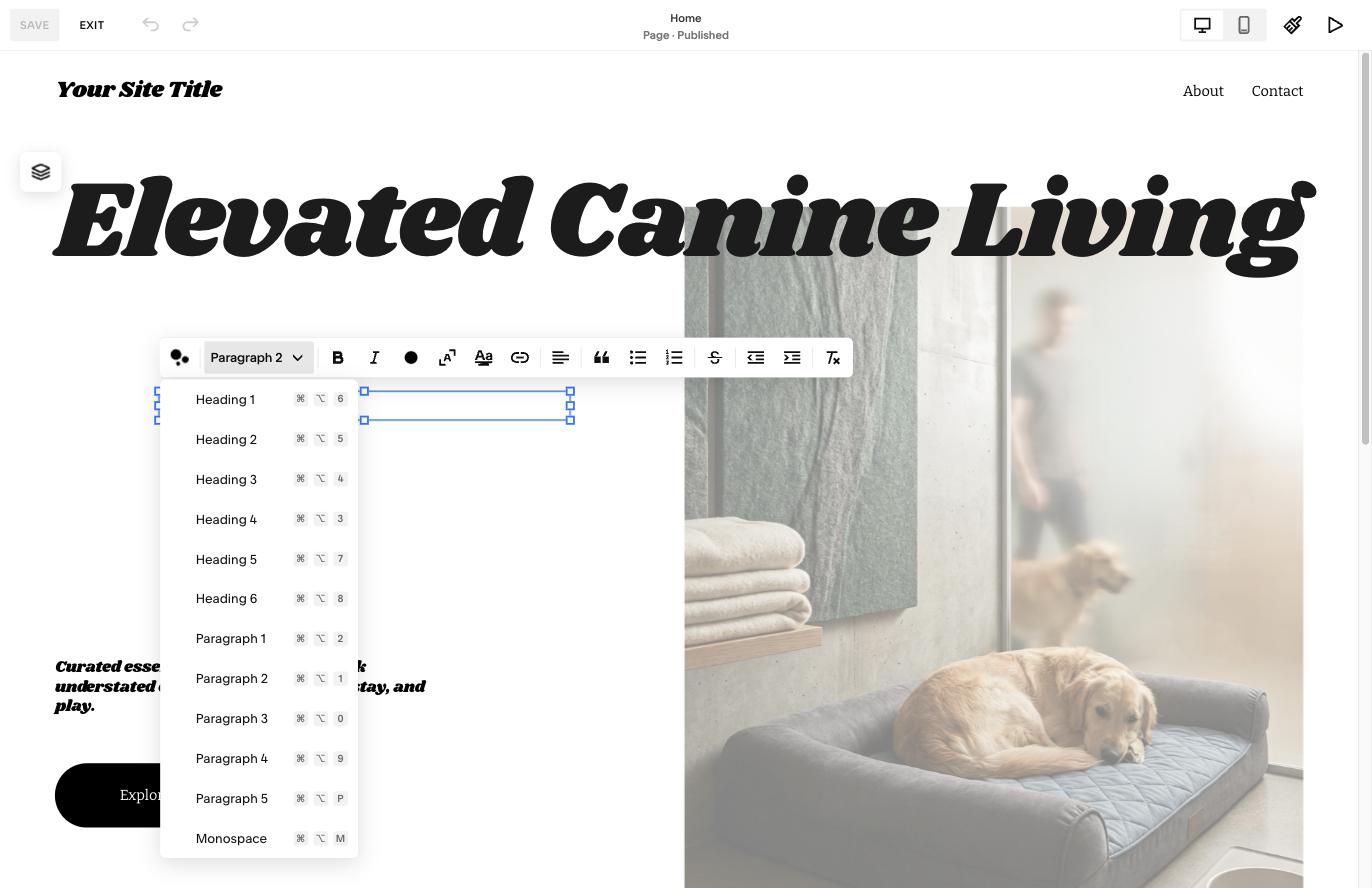
Heading 5 and Heading 6 in the Squarespace text menu
No. 2

In the native menu

Select your new text level right in the Squarespace editor's text dropdown. Everything lives exactly where the native controls do!

<h1> <h2> <h4> <h5>
No. 3

Real tags under the hood

Heading 5 and Heading 6 publish as real <h5> and <h6> tags, so screen readers and search engines follow the same outline your readers see.

Pricing

Buy once. Yours forever.

No subscription, no renewal.

One-time · 1 website

Single site

$39
USD
  • One Squarespace 7.1 site
  • All four levels + font panel sliders
  • Free updates & fixes
  • Email support
Get TextLevels
For designers · unlimited sites

Studio

$99
USD
  • Every site you build or manage
  • No site count, no expiry
  • Everything in Single site
  • Priority email support
Get the studio license

30-day money-back guarantee · Install help included · Squarespace 7.1, Core plan or above

Questions

Fair questions, straight answers.

Do I need to code?

No. Paste four lines into Settings → Advanced → Code Injection → Header, once. Everything after that is the text menu and your font panel.

Are they real tags on the published page?

Yes, for all four. In the editor each level is stored as a paragraph with a class, the same way Squarespace handles Paragraph 1, 2 and 3 — that's what makes it survive editing. Published, Heading 5 is a real <h5> and Heading 6 a real <h6>. Paragraph 4 and 5 publish as paragraphs, like the paragraph levels you already use.

What do I need to use TextLevels?

Squarespace 7.1 on Core or above, and an English-language admin.

Get TextLevels — $39, once